Validator Instructions: Step Into Digital Identity - One Selfie at a Time!
Feedback Quality Policy
We expect feedback to be complete, correct, and
specific. Please follow these guidelines:
- Select all applicable rejection comments for each image using the blue rejection comment box next to it;
- Use the rejection comment checkboxes in the bottom section of the job only if the comment applies to the entire job (Guide for Validators, section 2.2 “Rejecting the job”, p.12)
- The rejection comment “Age must be +12”can usually be applied to the entire job, provided the same person appears in all photos;
- The rejection comment “You are only allowed to wear your glasses in the first selfie” can be applied to the entire job only if the user is wearing glasses in all photos;
- The rejection comment “Requested changes were not made” can be applied to the entire job only if none of the changes requested by the previous validator were implemented.
- selected "Block Clickworker" (see Rejection and Resubmission Policy), or
- marked job as "Spam",
Click on the line starting with  sign for more detail.
sign for more detail.
Examples:
Exceptions:
If you:
then
no rejection comments regarding the photo quality are
required.
Rejection and Resubmission Policy
- If at least five images need to be redone, provide detailed feedback on all images and select "Discard job";
- If a user uploads authentic but inappropriate content (e.g., nudity, violence, substance abuse), select “Block Clickworker” and “Mark job as suspicious”, and use the rejection comment: “Inappropriate content.”
PII Policy
The media submitted by users must not contain any personal
information they did not consent to share, such as their name,
address, phone number, tax number, social media account, license
plate, etc. Additionally, personally identifiable information
(PII) of other individuals - including visible faces - is not
allowed.
📌 Only the participant should be visible in the submitted photos. No
other faces (e.g. people, TV screens), depictions of human faces
(e.g. posters, comic books), or human-like figures (e.g. statues,
toys) should be visible. Users are allowed to crop their photos,
but the final image must maintain good visual quality.
1. Scanned Document Photo Check
In this section, the user is asked to download a specific
mobile app, scan their NFC-enabled givernment ID, and upload
the headshot photo extracted from the chip.
Our goal is to confirm that the uploaded file is an
authentic scan from the chip, made using the app.
1.1 Media Info Requirements
- "Resolution in MP" must display 0 MP;
- Minimal width is 240px;
- There should be no additional EXIF data, such as the "Created at" timestamp or the camera brand/model.

1.2 Authentic Scan vs. Screenshot
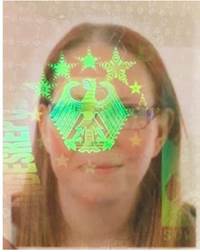
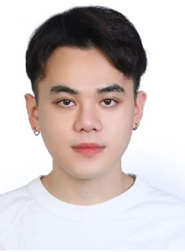
If the image is a face photo from an ID but contains watermarks, reflections, or signs of a screen capture, then it was not extracted from ReadID Me app.
1.3 Document Age
Ensure that the document's issue date is earlier than its expiration date. Expired documents are acceptable, provided they are not older than 10 years from the current date.
2. Selfie Photos (3 Required)
2.1 Variability
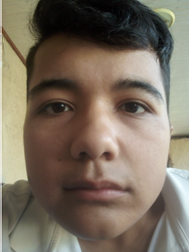
Each pair of selfies must differ in all three aspects: background, lighting, and clothing.

2.2 Glasses & Accessories
- The user is allowed to wear glasses only in the first selfie. If the single selfie with glasses is not in the first position, it must be moved there;
- Sunglasses are not allowed;
- Hats, scarves, or religious coverings are acceptable if they do not hide the face.
2.3 Quality & Authenticity
- No blurriness or poor lighting;
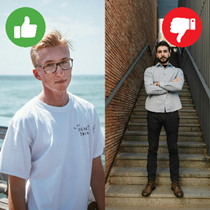
- Full head must be visible — cropped faces are not allowed;
- Photos must appear casual and authentic (social media style);
- Must be taken within the last 10 years;
- Full-body shots are not allowed;
- Natural (does not necessarily mean neutral!) facial expressions are acceptable, but exaggerated or unnatural expressions should be rejected;
- No filters or edits;
- Photos may be taken with the camera or uploaded from the gallery.
3. Social Media Photo (2 Required)
A different type of photo with slightly different
requirements.
- No repeated photos;
- Must be digital photo;
- Can’t have filters or edits;
- No sunglasses. Glasses are allowed;
- Hats and scarves are fine if they do not hide the face;
- Natural (does not necessarily mean neutral!) facial expressions are acceptable, but exaggerated or unnatural expressions should be rejected;
- No mirror selfies.
4. Historical Image (3 Required)
Older photos of the user
4.1 Requirements
- Must be digital only — no scans or photos of printed pictures;
- Full body shots are not allowed;
- Full face must be visible, with no sunglasses or obstructing accessories.
- No repeated photos.
- No filters, edits.
- Natural (does not necessarily mean neutral!) facial expressions are acceptable, but exaggerated or unnatural expressions should be rejected;
- Must be taken from age 12 onwards.
4.2 Time Spacing Rules
- Age 18–20 participants: Minimum 2 years between each image (e.g., ages 13, 15, 18).
- Age 21+ participants: Minimum 3 years between each image (e.g., ages 14, 18, 24).
- For all ages: Images must be taken at least 1 day apart from the selfies submitted for this job.
If you have any questions, please post them in Photo Validation MS Teams channel.